Dual-Stack Networks: Why You Only See One Address
IPv4 and IPv6 coexist in silence. Here is how to check both, and what a missing family tells you.

Almost every modern network is "dual stack": it has both an IPv4 and an IPv6 address. Yet any single web request uses exactly one of them, so whatever a website reports is only half the picture.
1. How the browser picks a family
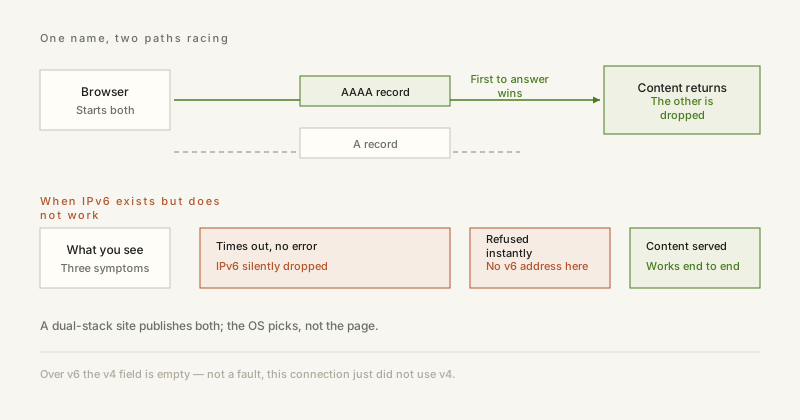
When a hostname has both A and AAAA records, browsers follow Happy Eyeballs: they start an IPv6 and an IPv4 connection in parallel and keep whichever handshake completes first. On a healthy dual-stack network, IPv6 usually wins — it has fewer middleboxes in the way.
2. Why you might see an empty field
- The site only reports the address of the connection you used — the other family is simply not visible from there.
- Your ISP announced IPv6 to your router but your device did not pick it up (missing prefix delegation, disabled in the OS, or an old router).
- A VPN or proxy client is IPv4-only and silently strips IPv6, which is a real leak risk.
- Mobile carriers frequently run IPv6-only with NAT64, so IPv4 works but no native IPv4 address exists.
3. How to test both
The reliable trick is to ask a single-stack hostname. A name that only publishes an AAAA record can only answer over IPv6 — a successful reply proves IPv6 works end to end. The same applies to an A-only name for IPv4.
4. Why it matters
If IPv6 is silently broken, every dual-stack site you visit waits for the IPv6 attempt to time out before falling back to IPv4, which shows up as random slowness. And if you pay for a VPN but your IPv6 traffic bypasses the tunnel, your real address is still visible.
5. Verify it yourself, once
No tooling needed. Take a hostname that publishes only an AAAA record and open it with curl or a browser. Content means IPv6 works end to end. A timeout with no error means IPv6 is being silently dropped. An immediate refusal means the machine has no IPv6 address at all. Repeat with an A-only name and you know the state of both families, which is far more reliable than a settings panel — a panel usually reports enabled, not actually working.
ipbox.one reports whichever family your connection actually used and probes the other one separately, so you can see both — or see clearly that one of them is broken.


