Two Leak Tests Everyone Should Run: WebRTC and DNS
A VPN can hide your address and still leave two doors open. Both are measurable in a browser, and both are usually misconfigured by default.
People talk about "IP leaks" as if it were one bug. It is at least two, sitting in different layers, with different fixes. You can close one completely and still be exposed through the other, and the fact that your browser shows the VPN address on a test page proves nothing about either.
1. First, decide which observer you care about
Every leak question is really "who is learning what". The site you visit learns the address that reaches it. Your local network learns which names you resolve. Your browser's network stack knows your local addresses and will happily tell a peer. A VPN promises to change the first; it says nothing about the second and the third unless it is configured to.
2. WebRTC: the browser hands out addresses to peers
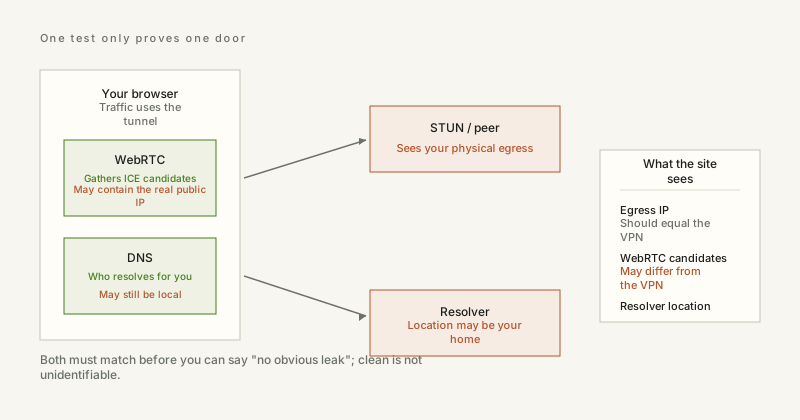
WebRTC exists so two browsers can connect directly for audio, video and data. To do that it gathers ICE candidates — including local addresses and public addresses discovered via STUN — and sends them to the other peer. If your VPN client does not route that traffic through the tunnel, the STUN request goes out over your physical network and the candidate list contains your real public address. The website can read that list from JavaScript without asking permission.
The signature to look for is simple: an address that differs from the one the site reported for your HTTP request, or a private range like 192.168.x.x appearing next to a public one. The first means your web traffic is tunnelled and your WebRTC traffic is not. The second leaks nothing to the internet by itself, but it does confirm that candidate gathering is unrestricted.
3. DNS: your resolver knows every site you open
Before any connection, a name has to become an address. That lookup usually leaves your machine in plain text, to whichever resolver the operating system picked — and the way systems pick is a mess of DHCP options, per-interface settings, systemd-resolved, VPN client scripts and browser-level DoH. Whichever wins is rarely the one the user intended.
The honest way to test it needs to be more clever than "ask a website": ask for a unique hostname, and have the authoritative server record which resolver queried on your behalf. That resolver address, and the network that operates it, is the only trustworthy answer. A resolver in the same country as your exit IP, run by the same provider, is normal for a direct connection. A resolver in a different country from your exit IP means your traffic exits in one place and your lookups leave from another — which is the definition of a DNS leak.
4. Reading both results together
- Exit IP and resolver in the same country, both from your ISP: no VPN, nothing leaking, everything as expected.
- Exit IP abroad, resolver still at home: the VPN is routing traffic but not DNS. This is the most common misconfiguration there is.
- Exit IP and resolver both abroad but from different providers: not a leak, but your two traffic paths take different routes, and the resolver sees everything even though the VPN does not.
- Resolver owned by Cloudflare, Google or Quad9: encrypted DNS is on. Your ISP cannot see queries any more; that company can, and it sees all of them.
5. Fixing them without breaking things
For WebRTC, the reliable fix is a VPN client with full-tunnel routing and a kill switch that covers UDP, not just TCP. Disabling WebRTC outright works — Firefox exposes media.peerconnection.enabled in about:config — but it breaks legitimate video calls, so most people should prefer a client that proxies STUN through the tunnel rather than turning the feature off.
For DNS, force the resolver at the tunnel level and verify it, because a browser or OS setting can override your intent silently. If the VPN client has a "DNS leak protection" switch, that switch is doing the work your config should be doing; test after every client update, since routes get rewritten. On networks you control, run your own resolver and hand it out via DHCP, then point that resolver upstream over DoT.
6. What neither test can tell you
Neither one measures whether you are identifiable. Your TLS fingerprint, the fonts you have installed, your timezone, your screen size and the way you type are all still yours, and a proxy changes none of them. A clean leak test means the obvious doors are shut, not that the room is empty.
ipbox.one runs both checks on the home page: the WebRTC candidates your browser exposes, and the resolver that actually answered, shown next to the address Cloudflare saw — so the three can be compared at a glance instead of inferred.


