The IP a Website Sees: Type, Ownership and Location
Three questions in order — what kind of address it is, who is registered for it, and where it claims to be. Each answers something different, and the third is the least reliable.

Judging a connection means asking three questions in order. First, what kind of address it is — anycast, datacenter, residential, carrier-grade NAT — because that sets the starting point for every risk score. Second, who is registered for it: the ASN, the RDAP record, the abuse contact, which is the only place you can find a responsible party. Third, and only then, where it claims to be — the coordinates GeoIP hands you, which look most like an answer and lie most often. Answer all three and you know who you are actually talking to.
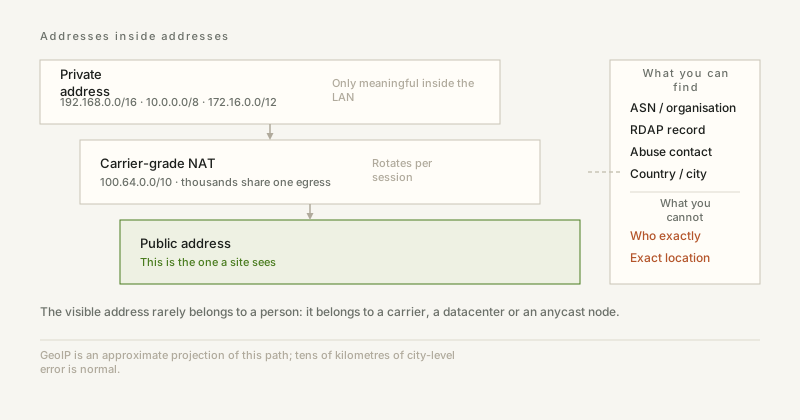
"My IP is 203.0.113.42" is wrong more often than it is right. The address a website sees may belong to the carrier behind your router, to a cloud instance you rented three days ago, or to a CDN node announcing one address in a dozen countries at once. Knowing which of those it is tells you more than memorising the number.
1. Anycast: one address, many machines
With anycast, several nodes worldwide announce the same route and packets go to the one that is closest in BGP terms. That is how 1.1.1.1 and 8.8.8.8 work: from Shanghai and from Frankfurt you reach two different servers that share an address. Anycast IPs are therefore almost never end users — they are infrastructure, and seeing one means your connection landed on a CDN or public resolver edge.
2. Datacenter: cheap, fast, automation-friendly
Datacenter addresses belong to hosting providers. An address under an AWS, DigitalOcean or Hetzner ASN is very unlikely to be a home line. Nothing about it is malicious, but bots, scrapers and cheap proxies prefer these ranges because they bill by the hour and can be created by script. The consequence: datacenter ranges start with a higher risk baseline in every anti-abuse system.
3. Residential: convincingly human, and priced accordingly
Residential addresses come from real consumer lines. They look like ordinary users without any disguise, which is exactly why a whole industry rents them: consumer devices turn their fibre line into an exit, sold by the gigabyte. Detection here is hard because the ASN looks completely normal; what is left is behaviour — dozens of accounts behind one address, sessions lasting seconds, request pacing that no person produces.
4. NAT and CGNAT: the address is usually not yours
A home router holds one public address and shares it across every device using private ranges (10.0.0.0/8, 172.16.0.0/12, 192.168.0.0/16). Once IPv4 ran out, carriers added a second layer between you and the internet, and thousands of households began sharing one public address that rotates as sessions come and go.
- Inbound connections mostly stop working: there is no port to forward to.
- Geolocation drifts — the address you are seen as may belong to a city hundreds of kilometres away.
- Reputation is shared: anyone else behind that NAT can turn their abuse into your CAPTCHA.
- The address changes on reconnect, so "static IP" was never part of the deal.
There is an upside. Behind CGNAT you are far less individually identifiable, and "block that IP" becomes a blunt instrument that punishes hundreds of innocent subscribers at once — worth remembering before you write that rule.
5. What the classification actually changes
- Fraud scoring: datacenter and anycast raise the baseline, residential lowers it.
- Rate limiting: you can safely be stricter on hosting ranges, while residential traffic needs behavioural rules instead.
- Privacy: a datacenter VPN hides your IP but is trivial to flag; residential proxies are stealthier, more expensive and ethically murkier.
- Forensics: a Tor exit needs no guessing — it is a known relay on a published list.
Sooner or later every abuse report, firewall rule or "why is this hitting my API" question starts the same way: you have an IP and nothing else. The good news is that registries are public and well documented. The bad news is that most of what people expect to find there does not exist.
6. Step one: the ASN, not the address
An IP tells you almost nothing on its own; the autonomous system that announces it tells you who operates it. Query the origin AS for a prefix and you get a number like AS24940 and an organisation name. That single hop answers most operational questions: is this a hosting provider, a mobile carrier, a university, a bank.
The quickest route is a looking glass or a BGP data site (bgp.tools is the least annoying). For scripted use, Team Cymru's DNS interface is the classic trick — reverse the octets in front of origin.asn.cymru.com and you get "ASN | prefix | country | registry | date" as a TXT record, with no API key and no HTML parsing.
7. Step two: RDAP instead of whois
Whois is a 1980s text protocol with a different output shape at every registry. RDAP replaced it with JSON over HTTPS, and every RIR now runs it. rdap.org resolves the right server for you, so a single GET is enough:
- https://rdap.org/ip/203.0.113.42 — returns the network object, its range, the RIR, and an abuse contact.
- https://rdap.org/domain/example.com — returns registrar, status codes and nameservers.
- https://rdap.org/autnum/24940 — returns the AS object with its registered contacts.
Read the abuse contact first. That is the address that actually acts on reports, and it is usually not the one in the general contact field. Registries also list a "remarks" field for operational notes; when a provider has moved its abuse desk, that is where they say so.
8. Step three: understand what the answer means
An org name is a legal entity, not a person. A /16 assigned to a cloud provider in 2014 is still the provider's network even if a thousand customers live inside it. A residential address registered to a national carrier tells you nothing about which subscriber used it, and behind carrier-grade NAT the answer is genuinely unknowable from outside — the carrier logs it, and only the carrier.
9. Three things every lookup guide gets wrong
- An IP does not identify a person. At best it identifies a billing relationship. Treat any claim otherwise as wrong, especially in a report you are about to publish.
- A WHOIS privacy service is not hiding a criminal. It is the default for every domain registered at a mainstream registrar since GDPR.
- A missing record is not proof of anything. Unallocated space, freshly delegated ranges and RIR rate limits all produce empty answers.
10. Etiquette, because these are shared services
RDAP servers are rate-limited and they publish the limits. Cache the answers — network objects change on the order of months, not seconds — and put a real User-Agent on requests so an operator can contact you instead of blocking you. Bulk-enriching a /16 in a loop is how you get an entire IP range 429'd for everyone.
Every GeoIP database is a guess dressed as a coordinate. Some are very good guesses, some are inherited from a spreadsheet someone typed in 2011, and the interface gives you no way to tell which one you are looking at.
11. Where the coordinates come from
Four sources, in descending order of how much people trust them. Registries publish which organisation holds which block, so the country is usually right by construction. Networks publish their own topology, which narrows things to a region. Devices with GPS report their position along with the IP they were using — when an SDK asks, that is the strongest signal available. And latency measurements can triangulate the distance to a target within a few hundred kilometres, which is useful for cases where nothing else exists.
The city field is therefore a statistical artefact. It is the place where the most devices using that address block happened to be, or where the operator registered its headend, whichever signal won that particular merge.
12. Four things that reliably break it
- A VPN or a cloud proxy: the address belongs to a provider, so the "location" is a datacenter, sometimes in a country that has nothing to do with the user.
- Carrier-grade NAT and mobile cores: an entire metropolitan subscriber base can surface from a handful of addresses registered at one exchange, so the city is right by accident at best.
- Anycast: one address is served from dozens of places, so no single coordinate can be correct. Databases usually pick one and never mention it.
- Satellite and enterprise VPN concentrators: traffic enters the country through a single gateway, and every user behind it inherits that city.
13. How accurate is it, really
Country accuracy is high enough to build on — high nineties for most vendors in most markets, lower where a single border region is served by a foreign operator. Region and city drop off a cliff: depending on country and vendor, city-level accuracy sits somewhere between "usually right" and "a coin flip", and the reported radius is often the most honest field in the record. If a database says the radius is 50 km, believe the radius, not the pin.
14. Why two vendors disagree
They buy different telemetry, weight it differently and refresh at different rates. One may follow the ISP topology, another the device signal, a third may still be carrying an allocation from a transfer that happened years ago. When two vendors disagree about a city, that disagreement is itself information: it means the block is ambiguous and you should not treat either answer as fact.
15. The rule that keeps it from hurting you
Use the country for policy, the city for display, and never gate a right or a payment on a city. Content licensing, tax treatment and legal jurisdiction are all decided at country or region level in most regimes, and a wrong city there turns a technical inaccuracy into a contractual problem. For anything financial, ask the user or use a signal they control, and always offer a way to correct the guess.
ipbox.one shows the country, city, region and the coordinates Cloudflare reports for your connection, side by side with your ASN, so you can see which of them look plausible and which one is your operator's headend rather than your desk.


