Mail in the Spam Folder? Check Three Things About the Sending IP
PTR, SPF lookup limits and DMARC ordering — the three checks that explain most delivery failures before anyone rewrites the copy.

When a transactional mail stops arriving, the first instinct is to rewrite the copy. Nine times out of ten the receiving side never read it — it decided before the body mattered, based on who was connecting and from where.
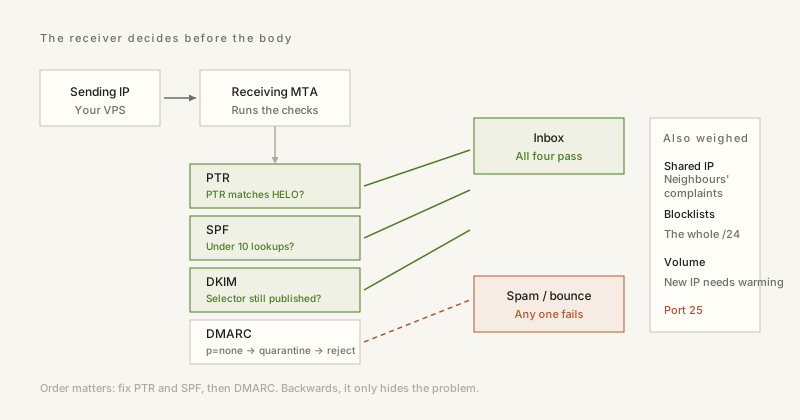
1. The PTR record is the first thing checked
Receiving servers reverse-resolve your IP and compare the result against the name you used in the SMTP greeting. On a cloud instance the default pointer is something like ec2-13-52-1-9.compute-1.amazonaws.com: it has nothing to do with your domain, it advertises the provider, and plenty of rules score it down immediately. Set the PTR to something you control — mail.example.com — and make the HELO string match it exactly. A mismatch between HELO and PTR is one of the cheapest signals a filter can use.
Note that you usually cannot set the PTR yourself. On a VPS it is a support ticket; on a cloud it is an Elastic IP setting. If a provider refuses to set it at all, that tells you how they expect their IP space to be used.
2. SPF has a hard limit of ten lookups
SPF is evaluated by resolving every include, a, mx and ptr mechanism, and RFC 7208 caps the total at ten DNS lookups. Exceed it and the result is permerror, which receivers treat as a failure — often silently, because nobody watches for a permerror. A typical stack of marketing platform, helpdesk and CRM includes is enough to hit the cap without anyone adding a mechanism by hand.
Count the lookups before you add another include, and flatten where you can: if a provider publishes a stable range, list it with ip4: instead of nesting includes. If the count is borderline, the honest fix is to send through fewer providers, not to raise the limit — you cannot.
3. DKIM first, then DMARC in stages
DKIM signs the message with a key published as a TXT record; 2048-bit keys are standard now. The common mistake is rotating the selector and deleting the old record the same day, which breaks every message still in flight — keep the previous selector published for at least a week.
DMARC sits on top and tells receivers what to do when neither SPF nor DKIM aligns with the From domain. Start at p=none with a rua address, collect reports for two or three weeks, and only then move to quarantine and finally reject. Skipping the observation phase is how teams discover, on the day they switch to reject, that the invoice system has been sending through an unauthenticated relay for years.
4. Shared IP or dedicated IP
- Shared pools are cheap and warm, but your reputation is partly your neighbours'. One compromised WordPress install in the pool can colour everyone's delivery.
- A dedicated IP starts with no reputation at all. Sending a thousand messages on day one gets you throttled; start in the low tens per day and grow over two or three weeks.
- IPv6 sending has its own reputation. A domain with a clean IPv4 history and a brand-new IPv6 address will still be treated as new on that path.
- Most VPS and cloud providers block port 25 by default. If you plan to send mail from an instance, open a ticket before you build anything.
5. Check the blocklists before you debug anything else
Look up the IP on Spamhaus ZEN, Barracuda and AbuseIPDB, and look up the surrounding /24 as well — several lists operate on the whole range because spammers rarely buy a single address. A fresh listing usually has a removal form; use it, then find out what sent the mail, because a delisting without a fix lasts about a week.
ipbox.one has a DNS lookup tool that queries A, AAAA, MX, TXT and NS over DNS-over-HTTPS, which is enough to read your SPF, DKIM selector and DMARC record straight from the browser while you work through the list above.


